Each local area page used to take us half a day to create and optimize.
With SEOmatic, we can create hundreds of pages in the same time, which helps our clients make the best use of their budget.
It's transformed how we deliver scalable SEO solutions.
Will Hawkins
Marketing Director, Digi-Business UK
Agents read your Search Console data, do the work, and prove what actually moved. You decide what ships.
14-Day Trial for $1, credited to your first payment.
Make it easy for your users to quickly find the integrations they need with a ready-made, effective framework.
We email you the template now, then 3 short emails on finding and keeping the pages your site needs. Unsubscribe in one click. We never sell your data. Privacy policy

Megha Goel | Last updated: October 23, 2026
If customers discover missing integrations after starting the software trial, it can lead to a negative experience. Providing all the information in advance is the best way to improve customer satisfaction. Use a proven framework to provide software integration information in a user-friendly way. Our free Integration Page Template was designed with a focus on SEO. It provides step-by-step guidance and best practices to help you highlight key integrations, enhance the user experience, and increase conversion rates.
A SaaS integration page is a webpage that shares information about how your software connects with other tools. There are two types of integration pages: hub and individual. A hub page shares information about all available SaaS integrations, while an individual page offers detailed information about specific integrations. These pages can greatly increase conversions because they are designed to draw highly targeted users who are looking for a specific integrations.
Many SaaS firms have trouble structuring their integration pages. Why? They either list all their integrations on the homepage or create a single dedicated integration page with too little information. These pages don’t provide enough details on how the integrations work or how they benefit users.
A high-converting integration page should:
• Share all the important details about each available integration.
• Help users easily find and understand the information.
• Highlight the benefits users will gain from the integration.
You can boost SEO and enhance the user experience by improving the structure and content of your integration page. This will help guide high-intent visitors through your sales funnel. Our free integration template makes it easy to create engaging integration pages.
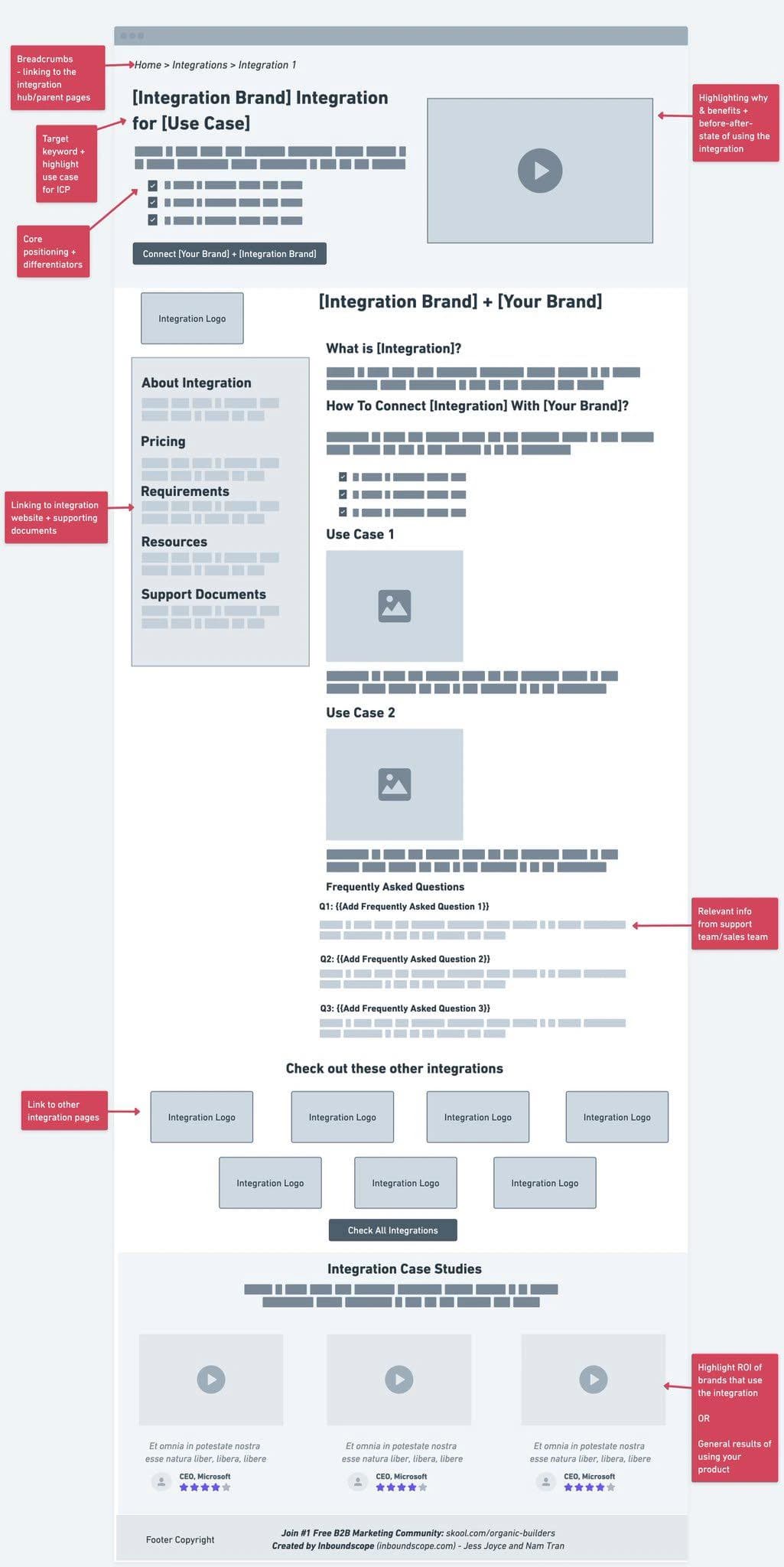
The template runs top to bottom in this order. Each block is there for a reason: search, trust, AI answers or conversion.
• Breadcrumb: The /integrations/ hub groups tools by category (payments, CRM, email).
• Hero: One sentence on what moves, which way and how often. Those are the three facts a searcher needs first.
• Field-by-Field Table: The heart of the page, with triggers and actions. It is what makes 40 integration pages different from each other. Pull it from your API docs.
• Setup: Real steps with screenshots. Name the permissions you ask for; people are wary of sign-in screens.
• Workflows: Three workflows customers actually run, from support tickets or usage data.
• Requirements: Who built it (you, the partner or Zapier) and the plan needed on each side. Behind half of all integration tickets.
• Partner Words: A line from the partner, or their own description. It makes the page unlike any other and often comes with a link from their site.
• FAQ: The top support questions about this integration.
• Related Integrations: Same-category integrations. Helps users and spreads links across the set.
• CTA: The button starts the connection when you can link straight to it.
Publish only when:
• The field-by-field table comes from your docs or API.
• Setup steps were tested this quarter.
• No two integration pages share more than their layout.
The one thing that matters most: The sync details are the page. Two integration pages that only swap the logo are exactly the thin pattern Google demotes.
Table of Contents
Megha Goel
B2B Content Writer
Megha Goel is our Content Marketer at SEOmatic, combining her technical background as a former software engineer with her talent for creating clear, engaging content.
Real quotes from the agencies and teams running their SEO on SEOmatic.
Brad Vali
President @Crescent Printing
Will Hawkins
Marketing Director @Digi-Business UK
Nick Berns
Agency Owner @BlueLightWeb
Milan Motavar
Product Manager @Mastercard
Ben Farley
SaaS Founder @Salespitch
Tom Baker
CEO @Solarmate
Joseph Lee
CEO @Supademo
Swarnendu Mandal
Head of Growth @Hoichoi TV
Lauren Wong
Chief of Staff & Operations @Arphie AI
Aaron Van Beilen
Registered Psychotherapist @Self-employed